 Now on the App Store
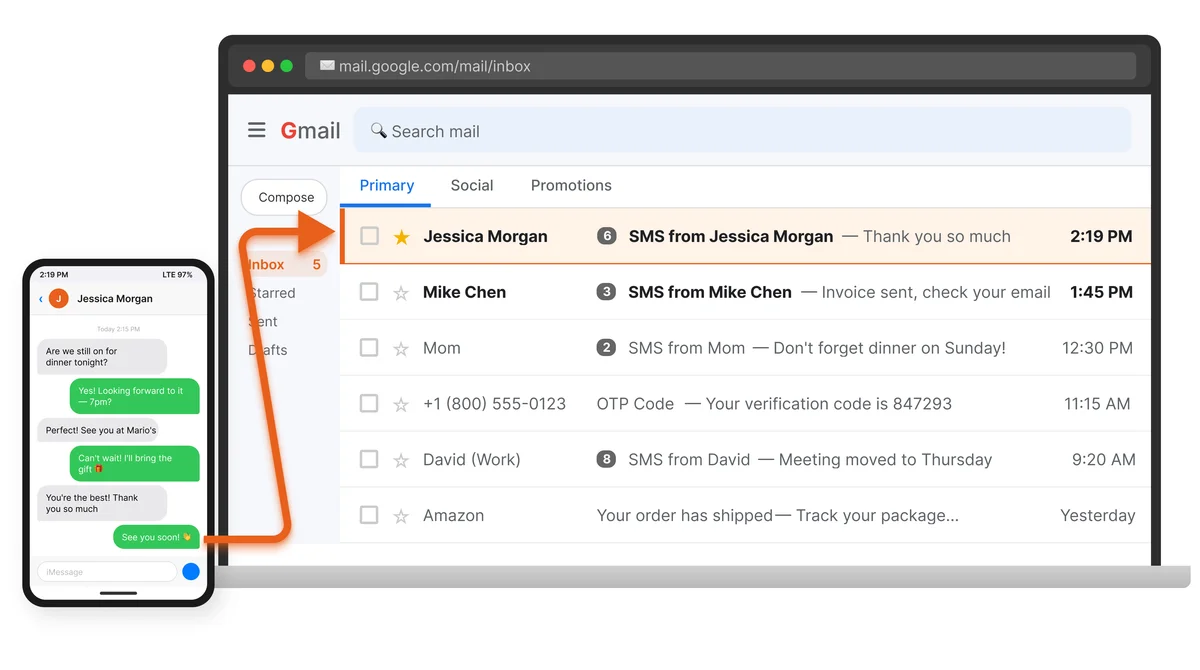
Automatically forward SMS, MMS, RCS & WhatsApp messages to email or another phone
Works on Android and iPhone*SMS and iMessage only. No MMS or reply from email due to iOS restrictions.. Set up in two minutes.
Free 30-day trial · No credit card required
Messages forwarded
Installs
On Google Play since
Ads, ever
What PhoneLeash does
Available on Android (full-featured) and iPhone*SMS and iMessage only. No MMS or reply from email due to iOS restrictions. (text forwarding).
SMS & iMessage to Email
Every incoming text message forwarded to your email, seconds after it arrives.
SMS to Second Phone
Forward texts to another phone via SMS. No internet or app needed on the receiving phone.
Reply Remotely
Reply from your email or second phone. PhoneLeash sends it as an SMS from your original number.
MMS, RCS & Pictures
Pictures and RCS attachments arrive as email attachments. Group messages show all participants.
WhatsApp Forwarding
Forward WhatsApp messages, reactions, and call notifications (direct and group, plus WhatsApp Business) to your email or a second phone.
Group Texts with Reply
Receive group texts and reply to the entire group — from email or your second phone.
OTP Forwarding
Auto-detect and forward verification codes from SMS or RCS. Empower teams to share services.
Keyword Filtering
Only forward messages containing specific keywords. Focus on what matters.
Contact Filtering
Filter forwarding by specific contacts or phone numbers.
Send New Texts from Email
Compose a new email to send an SMS from your phone — no need to touch the device.
Call Notifications
Get email alerts for incoming, outgoing, and missed calls with duration.
Contact Names
See sender names from your contacts, not just phone numbers.
Background Operation
Runs silently in the background. Auto-starts after reboot.
Dual-SIM Support
Correct SIM routing for replies. Works perfectly with two phone numbers.
2-Minute Setup
Install, enter your email or phone number, verify — done. No technical knowledge needed.
* iPhone: SMS and iMessage forwarding only. No MMS or reply from email due to iOS restrictions. Learn more about iPhone features.
Simple, transparent pricing
Start with a 30-day free trial. No credit card required.
OTP Only — Personal
Forward verification codes only
- OTP auto-detection
- SMS & RCS codes
- Email forwarding
- Background operation
OTP Only — Commercial
OTP forwarding for teams
- Everything in OTP Personal
- Up to 5 devices
- Business use licensed
- Priority support
Personal
Full SMS forwarding for one person
Billed semi-annually ($6.95 month-to-month)
- All message types
- Reply from email
- Call notifications
- Keyword filtering
- Dual-SIM support
Commercial
Up to 5 licenses for teams
Billed semi-annually ($19.95 month-to-month)
- Everything in Personal
- Up to 5 devices
- Business use licensed
- Priority support
Why people use PhoneLeash
Two phones, one inbox
Carry one phone, get texts from both. Personal and work numbers in one email inbox.
Travel without worry
Leave your local phone at home. Get important texts forwarded while you travel abroad.
Business teams
Forward customer texts to a shared inbox. Your whole team can see and respond.
OTP verification
Get verification codes on another device. Perfect for tablets, computers, or secondary phones.
No-phone workplaces
Work in a hospital, factory, or secure facility? Stay connected through email.
Continuous backup
Every text automatically archived in email. Searchable, permanent, always accessible.
Frequently asked questions
How does PhoneLeash work?
PhoneLeash runs on your phone and automatically forwards incoming text messages to your email or another phone number. On Android, it also forwards MMS, WhatsApp, RCS, and call notifications, and lets you reply from email. On iPhone, it uses Apple Shortcuts to forward SMS and iMessage texts to email.
Learn more: SMS to email · Forward to email · Forward to another phone · WhatsApp forwarding · RCS support
Is PhoneLeash free?
PhoneLeash offers a 30-day free trial with all features — no credit card required. After the trial, plans start at $1.99/month for OTP-only forwarding, or $4.50/month for full SMS forwarding.
Learn more: Pricing overview · OTP-only plan · Personal plan
Can I reply to forwarded texts?
Yes, on Android. If you forward to email, simply reply to the forwarded email. If you forward to another phone, text your PhoneLeash phone with 'tls' followed by your message to reply to the last sender. Either way, the reply is sent as an SMS from your original number. Not available on iPhone due to iOS limitations.
Learn more: Replying from email · Replying from your second phone
Does PhoneLeash work on iPhone?
Yes! PhoneLeash is now available for iPhone. It forwards SMS and iMessage texts to email using Apple Shortcuts automation. Setup takes about 2 minutes with our pre-built Shortcut.
Try it free for 30 days
Install the app, enter your email or phone number, and you're forwarding texts in two minutes. No credit card needed.