
Help › Android › Pricing & Licensing
Account Deletion and Cancellation
How to Delete Your PhoneLeash Registration
To remove your account, simply uninstall PhoneLeash. Your registration details — including name, phone number, and email — will be deleted within 7–10 days. Text data is not permanently stored.
Important: Uninstalling PhoneLeash will NOT cancel any paid subscriptions you may have purchased. See below for how to cancel.
How to Cancel Your Subscription
You can cancel your subscription yourself from the PhoneLeash dashboard. Log in with either your forwarding destination or your subscriber email — we'll send you a code to sign in — then cancel from there.
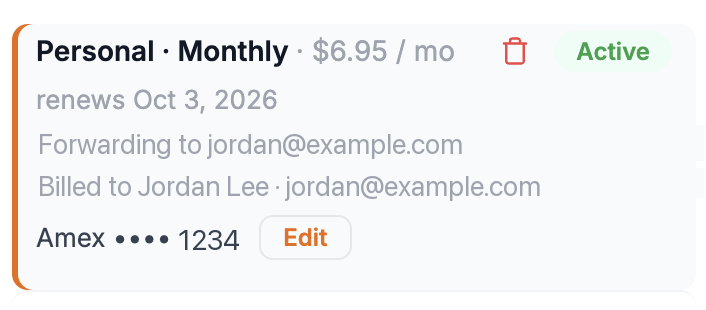
Find your subscription and click the trash / delete icon to start the cancellation. (The delete icon cancels the subscription — it doesn't remove your account.)
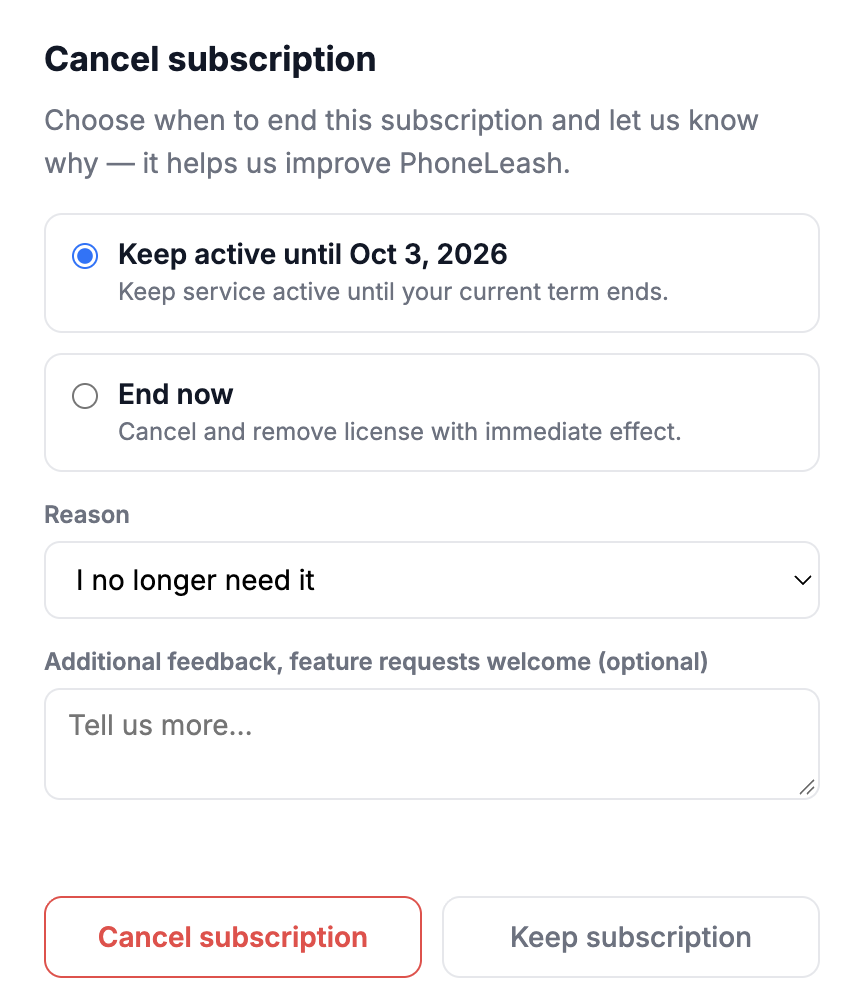
You can choose to keep service active until the end of your current term or cancel immediately, then confirm.
Once you cancel, you'll receive a confirmation email.
If you run into any problems, email support@phone-leash.com and we'll help.
Note: THERE ARE NO REFUNDS FOR REMAINING DAYS OR MONTHS. PLEASE ENSURE PHONELEASH WORKS FOR YOU DURING THE TRIAL PERIOD BEFORE SUBSCRIBING.