
How to Send Texts From Email
TLDR
Send a text from your email in three steps:
- Compose an email to
phoneleash@phone-leash.com - Leave the subject blank
- In the body, type
@5551234567 Your message here
PhoneLeash routes the email to your Android phone, which sends the text from your real number. The recipient sees a normal text from you. Replies come back to your email. No carrier gateways, no Twilio, no API keys, no campaign registration. Install PhoneLeash and you are up and running in two minutes.
If you have ever tried to send a text message from your email, you know the options are surprisingly bad. Carrier gateways are dying. Twilio requires a computer science degree. And most "email to text" guides on the internet are five years out of date.
PhoneLeash lets you send a text message by composing a regular email. No API keys, no campaign registration, no per-message fees. You write an email, and your Android phone sends the text. That is the whole thing.
Below, we will cover why the traditional approaches are falling apart and how PhoneLeash actually works.
Carrier Email-to-Text Gateways Are Dying
For years, the standard advice for sending texts from email was to use your carrier's email-to-SMS gateway. You would send an email to an address like 5551234567@vtext.com (Verizon) or 5551234567@tmomail.net (T-Mobile), and the carrier would deliver it as a text message.
This used to work reasonably well. It does not anymore.
Carriers have been quietly deprioritizing and degrading these gateways for years. Messages get delayed by minutes or hours. Some never arrive at all. T-Mobile's gateway has become particularly unreliable, with users reporting failed deliveries and messages arriving out of order. Verizon's vtext.com gateway frequently drops messages during peak hours.
The fundamental problem is that carriers have no incentive to maintain these free gateways. They make no money from them, and the gateways are increasingly exploited by spammers, which gives carriers even more reason to throttle or shut them down entirely. AT&T has already restricted its gateway significantly, and it is only a matter of time before others follow.
Even when gateway messages do arrive, they are stripped down to plain text with no sender identification, no threading, and no way to carry on a conversation. You are essentially shouting into the void and hoping the message lands.
If your workflow depends on reliably sending texts from email, carrier gateways are no longer a viable option.
Twilio Is Powerful but Painful
The next suggestion you will find online is Twilio. And yes, Twilio can absolutely send texts from email (with some glue code). But the setup process has become genuinely daunting.
If you have looked into Twilio recently, you have probably encountered terms like A2P 10DLC, campaign registration, brand verification, and TCR fees. These are not optional extras — they are now required for sending SMS in the United States. The carriers mandated this registration system to combat spam, and Twilio passes the requirements (and the costs) through to you.
Here is what a typical Twilio setup looks like today:
- Create a Twilio account and buy a phone number (~$1.15/month).
- Register your brand with The Campaign Registry (TCR). This involves submitting your business details, EIN, and website for review.
- Register a campaign describing what kind of messages you will send. Each campaign costs a one-time TCR fee plus a monthly fee.
- Wait for approval, which can take days or weeks.
- Write code (or use a no-code tool) to connect your email to Twilio's API.
- Pay per message — $0.0079 per outbound SMS segment, plus carrier surcharges that vary by carrier and can add another $0.003 to $0.006 per message.
If you are a developer building a product, Twilio makes sense. If you are a regular person who just wants to send a text from your laptop, this is absurd. "Registering campaigns" and "A2P 10DLC" should not be part of your vocabulary just to text someone from your computer.
And the costs add up. Between the phone number, TCR fees, per-message charges, and carrier surcharges, you can easily spend $30 to $50 per month for moderate usage — before writing a single line of code.
How PhoneLeash Lets You Send Texts From Email
PhoneLeash takes a completely different approach. Instead of routing messages through carrier gateways or cloud APIs, PhoneLeash uses your actual Android phone as the sender. Your phone is always connected to your carrier, always has your real phone number, and always has permission to send texts. PhoneLeash simply lets you trigger that from your email.
Here is how it works:
Sending a new text from email
- Compose a new email from the account you have set up with PhoneLeash.
- Address it to
phoneleash@phone-leash.com - Leave the subject line blank.
- In the body, type the recipient's phone number (or contact name) prefixed with
@, followed by your message:
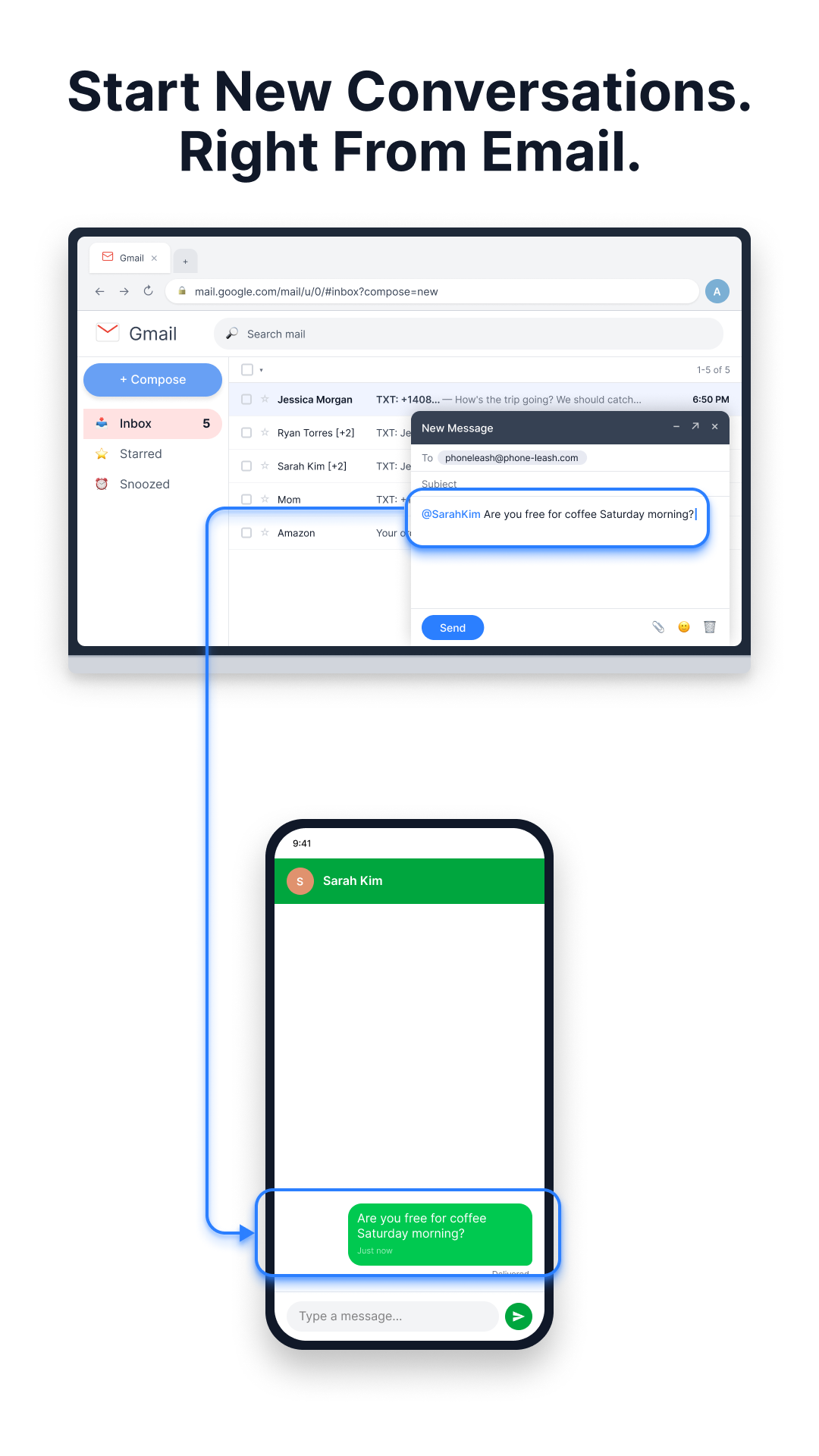
@5551234567 Hey, are you free for coffee Saturday morning?
That is it. PhoneLeash receives your email, routes it to your Android phone, and your phone sends the text from your real number. The recipient sees a normal text message from you — not from a random Twilio number, not from a gateway address, just from your actual phone number. The send-text-from-email guide covers the full syntax, including multi-recipient and contact-name shortcuts.
Using contact names instead of numbers
If the recipient is saved in your phone's contacts, you can use their name instead of their number. Just remove spaces from the name:
@sarahkim Are you free for coffee Saturday morning?
PhoneLeash matches the name against your contacts and sends the text to their number.
Replying to forwarded texts
If you already use PhoneLeash to forward incoming texts to your email, replying is even simpler. Just reply to the forwarded email — PhoneLeash automatically sends your reply back as a text to the original sender. No special formatting needed. The entire conversation stays in one email thread. The reply-from-email help article walks through what gets stripped (signatures, quoted history) and how multi-recipient replies are handled.
Getting Started
If you are already a PhoneLeash user who forwards texts to email, sending texts from email is already enabled — you do not need to change any settings. Just compose an email using the format above.
If you are new to PhoneLeash:
- Install PhoneLeash from the Google Play Store.
- Follow the two-minute setup wizard. Enter your email address and verify it.
- Start sending texts from your email immediately.
PhoneLeash includes a free trial so you can test everything — sending, receiving, replying — before committing.